

To optimize for Perplexity, make sure PerplexityBot can crawl your site, put a clear answer at the top of every page, back claims with named sources and data, add structured data, keep content fresh, and track which of your pages get cited. Perplexity doesn’t hand out ten blue links. It retrieves pages, pulls out the passages that answer a question, and cites the sources it used. Your goal is to be one of them.
How Perplexity Is Different From Google
Google ranks pages. Perplexity builds a short answer and shows its citations next to it. That changes what “winning” looks like: instead of fighting for position one, you’re fighting to have a passage on your page that is clear, trustworthy and easy to lift.
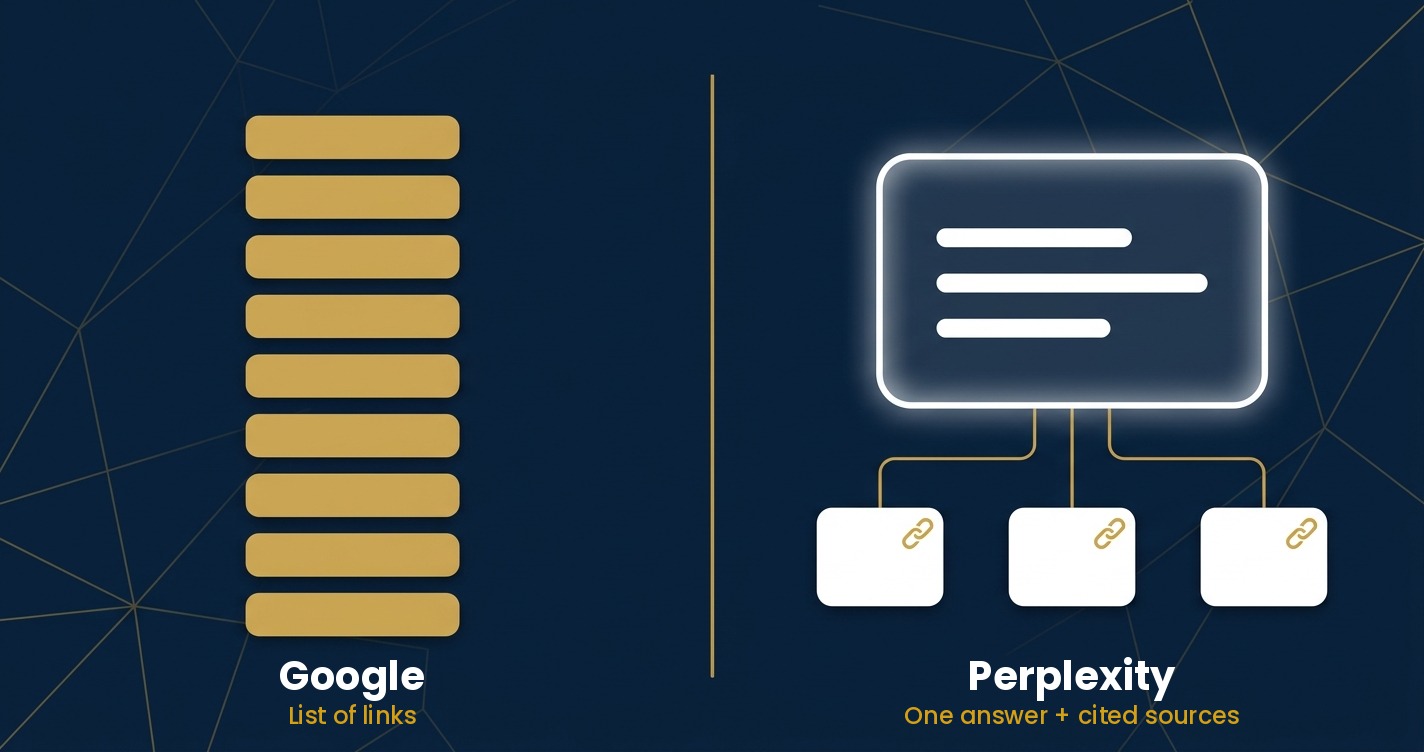
Perplexity runs its own crawler, PerplexityBot, separate from Googlebot. It also appears to draw on other search indexes, and there is meaningful overlap between pages that rank well in Google and pages Perplexity cites. So your existing SEO work isn’t wasted. It’s the foundation. If you’re still building that foundation, start with our complete website SEO guide and our technical SEO audit guide, then come back here.
Step 1: Let PerplexityBot Crawl Your Site
This is the one gate that matters most. If your robots.txt, firewall or CDN blocks PerplexityBot, nothing else in this guide will help. Perplexity documents two user agents: PerplexityBot, which indexes pages for its search results, and Perplexity-User, which fetches a page when a person’s question triggers a live lookup.
A simple robots.txt allowing both looks like this:
User-agent: PerplexityBot
Allow: /

User-agent: Perplexity-User
Allow: /

Sitemap: https://yourdomain.com/sitemap.xml
Then check beyond robots.txt. Bot-protection settings in Cloudflare or a WAF, and aggressive rate limiting, are common reasons a “allowed” bot still gets blocked. Check your server logs for PerplexityBot requests returning a 200 status. You can test your rules with our free AI Crawler Robots.txt Tester.
Step 2: Answer the Question in the First Few Lines
Retrieval systems grab passages, not whole pages. Open each section with a direct, self-contained answer of one to three sentences, then add detail underneath. If a reader (or a machine) lands on a single paragraph, it should still make sense on its own.
- Use headings that match real questions, such as “How long does a technical SEO audit take?”
- Lead with the answer, then the explanation.
- Keep paragraphs short and focused on one idea.
Step 3: Back Up Claims With Sources and Original Data
Perplexity shows its sources, so it favors pages that are easy to verify. Name the source of every statistic, link to it, and say when the data is from. Where you can, add something only you have: your own test results, client benchmarks, screenshots or a small survey. Original data gives an answer engine a reason to cite you rather than the five other pages repeating the same fact.
Step 4: Add Structured Data and Clear Entities
Schema markup helps machines understand what a page is. At minimum, use Article schema on posts, Organization schema on your homepage, and FAQPage schema where you have genuine question-and-answer content. Be consistent about who you are: the same business name, author names and descriptions across your site and profiles help systems connect your content to your brand. Our FAQ Schema Generator makes the FAQ markup quick to produce.
Step 5: Keep Important Pages Fresh
Perplexity tends to lean toward recent material, especially for queries where the answer changes, such as tools, pricing, statistics and “best of” lists. Review your highest-value pages regularly, update outdated numbers, and show a real “last updated” date. Only change the date when you’ve actually changed the content.
Step 6: Cover the Follow-Up Questions
Perplexity often suggests related questions, and its deeper research modes run several searches to build one answer. Pages that cover a topic thoroughly, including the natural next questions, give it more to work with. Build topic clusters: one pillar page, plus supporting articles that each answer a specific sub-question and link back to the pillar.
Step 7: Track Your Citations
Perplexity citations won’t show up in Google Search Console, so you need to check manually or with a tracking tool.
- List 20 to 30 questions your customers actually ask.
- Run them in Perplexity every month.
- Record whether your site is cited, which page, and who is cited instead.
- Look at referral traffic from perplexity.ai in GA4 to see whether citations turn into visits.
Pay attention to the competitors that keep appearing. Their pages show you the format and depth Perplexity currently rewards for your topic.
What About llms.txt?
An llms.txt file is a plain-text guide that points AI systems at your most useful pages. It’s cheap to add, and our LLMs.txt Generator can create one in a minute. But be realistic: Perplexity hasn’t publicly said it relies on llms.txt, so treat it as a low-effort extra, not a substitute for the steps above.
Common Mistakes to Avoid
- Blocking AI crawlers by accident through a plugin, CDN setting or old robots.txt rule.
- Burying the answer under a long introduction.
- Publishing vague claims with no sources or numbers.
- Optimizing only for Perplexity. The same habits (clear structure, good sources, fresh content) help in Google, ChatGPT search and AI Overviews too.
- Expecting instant results. Citations depend on being crawled, indexed and judged useful, which takes time.
Frequently Asked Questions
Can I pay to get cited in Perplexity?
No. Citations in answers are earned by relevance and quality. Perplexity does run a publisher program, but it is separate from standard citations and not something most sites need.
Do I need to rank on Google to appear in Perplexity?
No, but strong Google rankings and Perplexity citations often overlap, so good traditional SEO still helps.
Should I block PerplexityBot?
Only if you don’t want your content used in Perplexity answers. Blocking it removes you from the index it uses to build those answers.
How do I know if Perplexity is sending me traffic?
Check referral sources in GA4 for perplexity.ai, and run your target questions in Perplexity to see whether you’re cited.
Final Thoughts
Optimizing for Perplexity is mostly good SEO made easier to extract: open the door to the crawler, answer questions directly, prove your claims, and keep your pages current. Start with Step 1 today, since it takes minutes and everything else depends on it. Then pick your five most valuable pages and rework them one step at a time.
Not sure if Perplexity can find and cite your site?
Get a free SEO assessment and we’ll show you exactly what’s holding your visibility back, in search and in AI answers.